Tablet computer review. Looking for buying a new laptop or desktop computer or tablets, and want it to come with Windows 10? There's a huge range of devices to choose from Tablet computer reviews
Friday, October 23, 2015
Did You Know About These Built-In Battery Saving Modes In Windows 10?
The Power & Sleep menu, which can be accessed by going to Settings > System > Power > Sleep, isn't anything new. From this menu, you can choose how long your computer can be idle before it automatically shuts off the screen or goes into Sleep Mode. In addition to that, you can also customize it to do so when your computer is plugged in or running solely on battery power. There are also Additional Power Settings that you can click on, which opens up the Power Options menu in the Control Panel. From here you can edit your power plans, choose what happens when you close your laptop lid, or decide whether or not you need a password to unlock your computer when it wakes up from Sleep Mode.
A new feature with Windows 10 is Batter Saver. This is a battery-saving power mode that has been specifically optimized for Windows 10. This means that it can do things like limit background app activity and push notifications. This mode is very similar to ones that you would find on mobile devices, like smartphones or tablets. In addition to this, Batter Saver will automatically turn on when your laptop drops below 20% battery life though you can turn that off manually by going to Settings > System > Battery Saver and turning it off.
You can also tinker with Battery Saver mode. By going to the Battery Saver menu, click Battery Saver Settings to bring up the settings menu. From here you can adjust the point at which Batter Saver mode automatically kicks on from a range of 5% to 100% battery life. You can also choose whether or not to allow push notifications or lower screen brightness in Battery Saver mode or add app exceptions. Apps that you want to exclude from Battery Saver mode will be able to run in the background and send push notifications at all times.
The main Battery Saver menu allows you to see how much of your battery life is being used by different apps, simply click Battery Use to see. This will help you determine which apps to disable in Battery Saver mode, which is extremely useful. You can turn off the apps that drain the most battery life and not even worry about the ones that don't use any at all.
If you find yourself always needing to be connected when you're using your laptop and you can't figure out why your Windows 10 device is using so much power, consider going into some of these settings and tinkering around with things. You might be surprised at how much more efficient your battery usage will become and how much longer your laptop will last without having to be plugged in.
Content originally published here
Monday, March 10, 2014
Magnetic Materials Could Make Computers 1,000 Times More Powerful
Basically, everything you use daily, like your computer, phone, TV, and many other things, relies on tons of transistors packed together making an integrated circuit. When chained together, transistors act as logic gates. The energy passing through these transistors results in large amounts of heat and loss of electrons. There really shouldn't be a way around it, but multiferroic materials have found a way to bypass this.
By simply applying an alternate voltage, a multiferroic material can be switched on or off. Doing this allows it to carry power to different parts through spinning electrons instead of actually moving them. This effect is call a "spin wave bus". The energy of the wave moves in, but the actual molecules don't have to move at all. It is a little bit hard to understand, but trust me... that's how it works.
There was actually an experiment that the team did to test the ability of the materials to keep a stable spin wave bus. The device that they used in this experiment was made of nickel-based film on a piezoelectric substrate. The initial voltage is applied here to generate the spin wave. In the middle of the chip they used for the experiment was a 5-micrometer-wide ferromagnetic strip, which is where everything happens. The strip is the waveguide for the spin wave bus and directs power from one section to another without moving any electrons at all.
The experiment worked and successfully generated a voltage-driven spin wave. It is still a super long way away from replacing a regular charge current, but the team thinks that the improved efficiency of this method could make processors 1,000 times more efficient at very least. This would mean that there could be a whole new generation of computers that could work so much harder with a lot less power. The possibilities are endless.
Monday, August 27, 2012
Mobile Computing - Laptops, Notebooks, Tablets, or Smart Phones on Steroids?
Mobile Computing - Laptops, Notebooks, Tablets, or Smart Phones on Steroids?: notebook tablet pc
Just last week I was talking to a small business person who was in the recycling business, while I was at Starbucks. We talked how he was able to take two hours off in the middle of the day and sit and talk with me. He whipped out his new Apple iPhone IV and he showed me. He has a contract with AT&T and he was able to pick up the phone for only $ 199. This is a lot less expensive than the original iPhones, and apparently Apple is now competing quite well with the other smart phones which are trying to imitate its revolutionary technologies.
Prior to this he said he took his laptop or notebook around with him so he could run his business. He was considering buying a tablet, but he said; "with all the new business apps that I've owned," it was not until now that he can run his business just fine all from a small device like this. He also explained it had security enhancements to protect his e-mail messages and attachments. And he was able to integrate his phone with his Microsoft exchange business e-mail files, and he had corresponding folders that were also on his laptop which he can pull up from his iPhone.
Apparently, he does not feel at all as if he is encumbered with such a small device. I related to him the fact that I owned one of the first transportable cellular phones back in the day. And even though it cost me $ 1000 per month to pay for the minutes I used, I too was able to run most of my business from that phone. And back then we didn't have computers, and fax machines had just been invented. It is amazing how do technology devices free up a small business person so they can do mobile computing on the go.
Just then, he received an e-mail, confirmed an order, called his manager, and sent a text message back to the customer. Basically he did that in about 2 min., and we continue our conversation. This just goes to show you that you don't need a laptop, a notebook, or even a tablet computer to participate in the new mobile world of business.
The reason I mention this, is I got an advertisement in the mail from AT&T with about the same offer that he was explaining to me, along with all the options, and an explanation of all the business apps which were readily now available. It makes sense. Indeed I hope you will please consider this.
Lance Winslow is a retired Founder of a Nationwide Franchise Chain, and now runs the Online Think Tank. Lance Winslow believes it's hard work to write 21,300 articles; http://www.bloggingcontent.net/
Article Source:
http://EzineArticles.com/?expert=Lance_Winslow
Notebook Tablet Pc Videos
Monday, April 23, 2012
Best Tablet Laptops Gathering
Best Tablet Laptops Gathering :
As a new member of notebook, tablet laptop with similar appearance is regarded as a condensed version of notebook. Tablet laptop is bigger than palm computer but smaller than notebook in shape. What's more, tablet laptop is more powerful than palm computer in handling ability. Compared with notebook, tablet laptop can also support handwriting input or voice input, in addition to all of notebook's functions.
As tablet laptop features excellent mobility and portability, it has received more and more favor. We have collected the information of best tablet laptops to share with you who are keen on tablet laptops.
Apple iPad Tablet
The bulk of iPad's surface is taken up by a 9.7-inch, 1024 x 768, capacitive, multitouch LED-backlit display surrounded by a glossy black bezel that some will say is too wide but, in practice, is an important design consideration that prevents the touchscreen from being inadvertently activated when handled.
The iPad does house a few other components you should be aware of: a volume rocker and screen position lock (which forces the device to remain in landscape or portrait mode) on the upper right hand side, a power / sleep button and headphone jack on either side of its top edge, and Apple's famous 30-pin dock connector alongside a single thin speaker on the bottom of the unit.
As you probably know by now, the iPad packs Apple's custom, PA Semi-designed 1GHz A4 system-on-a-chip -- a single Cortex A8 core coupled with a PowerVR SGX GPU.
HP Tablet -HP Slate 500
HP Slate 500 features a wide viewing angle 8.9-inch 1024X600 capacitive display which supports multi-touch operation, together with HP Slate Digital Pen for convenient handwriting. And HP Slate 500 packs 1.86GHz Intel Atom Z540 processor, 2GB RAM and 64GB SSD.
HP Slate 500 has built in front facing webcam camera for video conferencing while the back facing 300 million pixel camera for video recording.
HP Slate 500's built-in WiFi CERTIFIEDTM WLAN helps users send and receive Email at home or office. What's more, HP Slate 500 runs Windows 7 Professional which certainly sets it apart from the other Win 7 tablets.
Dell Tablet -Dell Inspiron Duo Tablet
New slick designed Dell Inspiron Duo Tablet allows being converted into a netbook just by opening the hidden keyboard and swiveling the screen.
Dell Inspiron Duo Tablet got a 10-inch screen, houses a dual-core Atom N550 and runs Windows 7 Premium. Dell was demonstrating how a fairly standard 10″ Inspiron Duo transform from dell tablet to netbook on stage.
Then he deployed the keyboard, Dell Inspiron Duo tablet looks like a normal, reasonably thin netbook, except for the screen or bezel. However, with one push of a thumb, the screen swivels around the midpoint and the bezel is revealed as a frame. The screen starts to rotate into the alternative appearance.
ASUS Tablet - Asus EeePad
ASUS Eee Pad EP121's lid is designed with no screws and made of anti-fingerprint material. 12-inch Asus Eee Pad EP121 with Intel Dual Core processor, Windows 7 Home Premium pre-installed operating system, can simultaneously send and receive e-mail, open the video conferencing, access to calendar and supports Wi-Fi and 3G Internet access, etc.
Asus eee tablet has built-in Opera Web browser. And Opera exclusive web data compression technology provides users with faster Internet access quality.
And unlike the iPad, it supports multitasking and full flash support. Everything you can do on your home computer, you can do on the Eee Pad. A virtual keyboard or docking station keyboard can be used. Battery life is quoted at more than 10 hours.
Toshiba Tablet - Toshiba Folio 100
Toshiba has waded into the tablet market with the Folio 100. Like the Samsung Galaxy Tab, Toshiba's Android-powered slate aims to take on the iPad. The 10.1-inch Folio packs Android 2.2, as does the 7-inch Tab, but it's much lighter on features than Samsung's slate.
The Toshiba Folio 100 looks set to present consumers with a familiar choice: Apple elegance or Android openness? Without stunning appearance, black Toshiba AS100 is piano lacquer finish decorated with silvery lines around. Matte textured Toshiba Folio 100 tablet offers great handfeel. Silvery TOSHIBA logo is designed in the center. And the Nvidia label declares the strong core at the lower right corner.
Toshiba Folio 100 sports Nvidia Tegra T2 processor and integrates eight separate processing chips, including the world's first mobile-optimized up to 1GHz dual-core ARM Cortex A9 CPU for a maximum operating frequency. Due to the ARM architecture, it is impossible to install Windows XP or Win7 system on this platform.
Samsung Tablet - Samsung Galaxy Tab Android Tablet
Samsung Galaxy Tab Android Tablet features a 7-inch touchscreen (1024×600 pixels), WEYPE virtual keyboard and dual camera, based on Android 2.2 OS (Froyo),1.2GHz Hummingbird processor, PowerVR SGX540 chip and new Touch Wiz UI.
The Tab doesn't have a Super AMOLED screen like its Galaxy S smartphone brothers, but the 1024 x 600-resolution LCD is still stunning. It's notably better than most other tablet screens we've seen of late, which, of course, means that the first thing we noticed was its stellar viewing angles.
Other specification of Samsung Galaxy Tab Android Tablet includes 2MP front camera and 5MP camera for video meeting, a 16 GB built-in storage and a microSD card slot and 3.5 mm headset jack. Galaxy Tab Android Tablet will support 3G, HD video display, navigation and video call. According to the configuration, Samsung Galaxy Tab will have a good performance in speech quality and Flash.
As tablet laptop features excellent mobility and portability, it has received more and more favor. We have collected the information of best tablet laptops to share with you who are keen on tablet laptops.
Laptop Tablet Videos
Wednesday, April 18, 2012
Top Reasons Why Tablet PCs Trump Laptops!
Top Reasons Why Tablet PCs Trump Laptops!: t mobile tablet
Whenever new technology applications emerge, predictions for their complete takeover of the marketplace, inevitably, follow. The appearance of the rugged tablet PC has attracted huge interest from sectors such as civil engineering, architectural design and wholesale/retail enterprises while ultra-mobile PCs, increasingly, are being seen making an extremely useful contribution to the medical, educational and scientific research sectors.
Early adoption of the handheld PC by media and marketing enterprises is not too surprising and their increasing presence in the office and general workplace is actually causing confusing questions to be asked. Inevitably, comparisons are made with the functionality of the smartphone, laptop and netbook and whether a particular business really needs a mobile tablet PC, or under the current economic climate, just hold on to their present technology devices.
The mobile tablet PC actually bridges the gap between laptops and mobile devices, providing the functionality of a laptop without some of the restrictive drawbacks. Early touchscreen tablets were simply basic laptops with a swivelling screen, which could be folded back onto the keyboard and used as a touchscreen.
The new generation of touchscreen tablets are slim, lightweight, easy to transport - and fast! Hence, the reason they are known as the ultra-mobile PC or UMPC! The onboard range of specialised software is custom designed specifically to run quickly on the operating system for seamless word processing, note taking, audio/video playback and touchscreen interaction. The result is quicker start-up times, ability to perform many tasks, a smooth user experience and a battery life significantly longer than even the most economical laptops.
Undoubtedly, a major advantage are the thousands of applications available! 'Apps' are one of the tablet's biggest selling points. Uniquely created software and generally low-cost or free, they offer specialised and direct site access functionality. Apps can be downloaded permanently onto the tablet screen for an exhaustive range of categories including today's business essentials such as instant messaging, email, video calls, note-taking and conference calls.
Although the operating system is often unable to run the latest software and games, or make native phone calls apart for certain apps allowing voice calls to be made over a Wi-Fi connection, the undoubted mobility of a handheld computer for the busy, always on the move, executive traveller is a key factor. Ability to use the vast range of business-oriented apps in a diverse range of environments more than makes up for certain drawbacks. Limited processing power means restrictions on using certain image manipulation software, an onscreen rather than physical keyboard, and slightly smaller screen sizes.
However, as the use of cloud computing becomes essential as the only real means to store, access and exchange ever larger bytes of data via the web, the mobile tablet PC will become an indispensable business tool. Smooth interaction with vast amounts of stored key data can be easily and quickly accessed at any time, in any location and under any working conditions. Already, the deskbound PC is being outsold by the mobile and it may only be a matter of time before the tablet PC does takeover as the No.1 technology device to rival the smartphone.
http://www.camtechsystems.co.uk/ are a professional computer sales and support supplier of a range of high quality Tablet PC equipment and are the UK distributor for PaceBlade, Motion and Armor Computing products and services, as well as being partnered with Web DT Technology, JLT and Viliv.
Article Source:
http://EzineArticles.com/?expert=Kelvin_Graham
T Mobile Tablet Videos
Sunday, April 8, 2012
Windows 7 Home Premium Edition and Laptops
Windows 7 Home Premium Edition and Laptops: windows xp tablet pc edition
Windows 7 is one of the most advanced and recent operating system applications by Microsoft Corporation and a large number of people have been admiring this edition. Most of the laptops and desktops that are sold these days have Microsoft Windows 7 integrated into the machine as its basic operating system. Windows 7 is a great improvement and enhancement when compared to Windows Vista and it has fixed most of the issues that were encountered while using Vista. You can easily install Windows 7 home premium or Windows 7 professional edition on your laptop; however, you need to make sure that have saved all your considerable files and data first. On the other hand, if you are considering buying a laptop Windows 7 home premium or Windows 7 professional edition then following are some of the top listed laptops in the market integrated with Windows 7 operating systems.
1. Dell Series Z; one of the best notebooks with Windows 7 operating system. Nevertheless, it can be extremely heavy on ones budget but it has all the latest technologies available with it.
2. HP TX2; this model has been rated as one of the best tablet notebook all around the year. It costs approximately $ 800 and the screen size is around 2-inches. It is a stylish design along with a LED backlit display. Nonetheless, mostly people find it extreme difficult to use.
3. HP dv6t; it is one of the notebooks that is rated to be the best value product. The price range is quite reasonable.
You must have enjoyed reading this article; on the other hand, if you are looking out for such laptops that have been incorporated with Windows 7 home premium or Windows 7 professional editions then you can go to itshop104.com. Here, you will be able to find out the best deals related to laptops that have Windows 7 professional and Windows 7 Home premium edition as their basic and integrated operating system application.
Article Source:
http://EzineArticles.com/?expert=Arshadali_Mahmud
Windows Xp Tablet Pc Edition Videos
Saturday, February 25, 2012
Top 5 Disadvantages of Tablet Laptops
Top 5 Disadvantages of Tablet Laptops: tablet laptops
People are speaking only about the advantages that are available in tablet laptops so does it mean that there are no disadvantages? No it does not mean that way. Tablet laptops also have disadvantages and here are few for you.
Though the touch screen has many advantages in it there are quite a few disadvantages too. Some people are really finding it difficult to view the items in the small screen of the tablet laptop. The maximum screen size available in tablet laptops are 14.1 inches so it is really hard to read items.Second main disadvantage is that you cannot have an optical drive internally as these tablet laptops are designed to maintain less weight. However you can connect it externally.
Handwriting recognition is a boon but it also has its other side. Your tablet laptop can only understand your handwriting but not of others. So only a single user can use a tablet laptop for life time.
More screen damages are possible because the input is given from a pen so you need to touch it often. Input rate is also slower when compared to ordinary laptops i.e. input from a keyboard and a mouse is much faster than a pen in tablet laptop.
Price is the last point to be noted as tablet laptops are bit costlier than ordinary laptops.
Everything in this world has pros and cons so it is up to the users to decide according to their needs. If you compare advantages and disadvantages then advantages gains an upper hand as it is more.
Read more about tablet laptop news and latest tablet laptops reviews and information.
Article Source:
http://EzineArticles.com/?expert=Praveen_Sivaraman
Tablet Laptops Videos
Sunday, January 29, 2012
Windows 8: Good For Laptops And Tablets
Windows 8: Good For Laptops And Tablets: samsung windows tablet
Microsoft recently held its BUILD conference, a developer-only event at which the highlight was the unveiling of Windows 8. It wasn't exactly a shock reveal; there's been plenty of information on Windows 8 available up in bits and pieces, but this was Microsoft's first peek under the curtain at the nitty-gritty of Windows 8 itself. As you might expect, Windows 8 is expected to run more quickly than its predecessors, but then, Microsoft's very unlikely to reveal that it'd run slower. A lot of small details emerged, such as the fact that support for NFC (Near Field Communications) will be built into Windows 8, as will simpler setups for refreshing a system prior to selling it, removing malware more efficiently and a revamp of some standard Windows user interface sections such as the Task Manager. Cloud synchronisation and a very Apple-like App store for Windows applications will also feature on the full desktop client, which at first glance looks an awful lot like Windows 7 does now. That could well change, but a lot of the real meat of what Microsoft had to show off was to be seen in how it'll adapt Windows 8 for the tablet market.
Microsoft's had tilts at the tablet market for years now, but outside certain specialised niches, they've never had that much success -- especially in the era of the iPad. Windows 8 has a lot of tablet-specific features, including a full tablet user interface called Metro that Microsoft showed off at the Build conference on a Samsung supplied tablet that all attendees got to take away with them. Microsoft's built on the interface ideas it first showed off with its Windows Phone 7 devices, and the results are quite spectacular. It's also worth noting that while Windows tablets to date have all run on Intel hardware, Windows 8 will also run on more power-efficient ARM processors, although there will be tradeoffs for the ARM models, which won't run legacy Windows applications, just the specialised touchscreen ones. Whether by whatever time Windows 8 launches it'll be able to make a dent in the iPad's near dominance of the tablet market remains to be seen; a good half-dozen Android tablets haven't managed that, and the rest seem to be bogged down in legal battles with Apple.
Microsoft haven't announced a timeline for when Windows 8 will ship (except to say that it'll ship "when it's done"); at a guess I'd say we'd be lucky to see it on store shelves and in laptops, desktops and tablets before at least the middle of next year.
Anthony Hill - Geeks2U
Australia's leading provider of on-site computer repairs and technology support for home and business, Geeks2U delivers prompt, no fuss, same day services to customers nationwide, seven days a week.
Article Source:
http://EzineArticles.com/?expert=Anthony_D_Hill
Samsung Windows Tablet Videos
Monday, January 16, 2012
Laptops Review-Samsung Galaxy Tab 2 (10.1)
Laptops Review-Samsung Galaxy Tab 2 (10.1):
Article by SmithJames
Laptops Review-Samsung Galaxy Tab 2 (10.1) - Computers - Laptops
Search by Author, Title or Content
Article ContentAuthor NameArticle Title
Home
Submit Articles
Author Guidelines
Publisher Guidelines
Content Feeds
RSS Feeds
FAQ
Contact Us
Samsung improves its flagship Galaxy Tab 2 (10.1) tablet by upgrading it to Android 4.0 "Ice Cream Sandwich" and dropping the going price to $ 399.99 (list). While the Galaxy Tab 2 (10.1) is saddled with an awkward name, and its benchmarks aren't exactly going to burn up the charts, it looks like an elegant option if you want a quality Android-powered tablet.
First, what do we call this thing? I'll vote for the "Tab 2-10." Superficially, it looks a lot like most other 10-inch tablets out there--a rectangle with rounded corners and a slightly textured metallic back. At 10.1 by 6.9 by .38 inches (HWD) and 20 ounces, it could fit seamlessly into an array of other similar tablets. The processor is a pretty stock model, too: The same 1-GHz Nvidia Tegra 2 we saw in the earlier Galaxy Tab 10.1 (3.5 stars).
But turn it on, and hurrah! It's Ice Cream Sandwich! Samsung has TouchWizzed ICS, so it looks and works a lot like Samsung's other tablets. But you want this version anyway because ICS is where the future is: This is the OS Google is targeting for the next generation of tablet apps. Samsung has laden the Tab 2-10 down with bloatware, but it's largely useful. You get Netflix, a roomy 50GB of Dropbox space, various music and game stores, Kindle, an office app, and Samsung's new Samsung Apps, which helps you sniff out tablet-friendly apps in the otherwise tablet-unfriendly Google Play store.
The flagship app, though, is Peel Remote, which we've reviewed previously on the Galaxy Tab 7.0 Plus ($ 399.99, 3.5 stars). Peel works with the Tab 2-10s built-in IR blaster to act as a smart remote control for your home theater system. When we tried it on the new Tab 2 (7.0), which is made of the same stuff as the Tab 2-10, we found it to be more usable and responsive than it had been on the earlier tablet.
Otherwise, a MicroSD card slot helps keep storage flexible and prices down. This Tab only comes with 16GB of built-in storage, but you can go up to 48GB using memory cards. There's a 3-megapixel camera on the back and a VGA camera on the front, and the tablet has an HDMI output port for TVs. It connects to the Internet using Wi-Fi 802.11 b/g/n--no 3G here, and no carrier contracts.
At $ 399.99, the Tab 2-10 goes up directly against Apple's same-priced iPad 2 ($ 399, 4.5 stars). Just to look at the specs, Samsung has a superior tablet. Apple's iPad has a lower-resolution screen at 1024-by-768, an inferior camera, and doesn't have expandable memory or an IR blaster. But these factors are dwarfed by the huge number of iPad apps available: over 200,000, compared with about 1,500 in Tablified Market (4 stars), the best directory of Android tablet apps.
Seven-inch tablets like the Samsung Galaxy Tab 2 (7.0) ($ 249.99, 4 stars) can get away with running phone apps decently, but apps designed for phones look awful on a 10-inch screen. Many Android fans have told me that the built-in apps are enough--that with a good browser (and Android has several) and Peel Remote, you'll have a useful tablet here with the help of Gateway Laptop Keyboard. That may be the case, but go in with your eyes open.
This tablet will be available for pre-order on May 4, with real sales starting on May 13, at Best Buy, Amazon, and other large electronics retailers.
For more laptop reviews,
The author is an experienced Content writer and publisher on the topics related to laptops laptop accessories and tablets .
Use and distribution of this article is subject to our Publisher Guidelines
whereby the original author's information and copyright must be included.
SmithJames
RSS Feed
Report Article
Publish Article
Print Article
Add to Favorites
Article Directory
About
FAQ
Contact Us
Advanced Search
Privacy Statement
Disclaimer
GoArticles.com
Friday, January 13, 2012
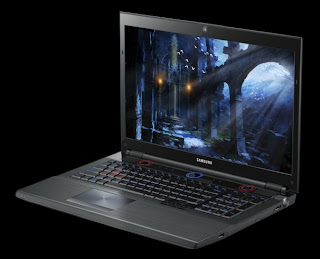
Upgraded Samsung Series 7 Gamer Laptop Set to Hit U.S. in April
Us laptop gamers here in the states have been pretty envious of our European brothers as they have had the privilege of buying the Samsung Series 7 Gamer notebook since last spring. Well, this spring (April, to be specific) that envy dies and becomes reborn as jubilation as Samsung will be shipping the Series 7 Gamer to us Yanks while giving it a nice increase in specs at the same time.The 17" gaming laptop will still have the same aesthetics, as well as the same external features, as its European counterpart, including the 2.1 speaker setup with down-firing Subwoofer, super-bright screen and that big knob thingy that switches the device between power modes, like the Gaming Mode, which clocks up the CPU turbo mode, changes the keyboard backlighting, disables the Windows key and a few other things. The only real external difference is the lack of a 3D display option and the addition of a DisplayPort output.
Crack this bad boy open and you will be able to find the differences. On the inside the Series 7 Gamer gets a nice new set of parts. The second generation Intel Sandy Bridge Core i7 processor is gone, replaced by a quad-core third-generation Intel Ivy Bridge Core i7 processor instead. In addition to that, the graphics have received an increase from the Radeon HD 6970M to the upcoming GeForce GTX 670M. You will still have a Blu-ray drive as well as the 2TB hard drive so nothing's new there.
You will be able to grab this mobile gaming giant when it is released in April for a reasonable $1,799, or whenever Intel's high-end Ivy Bridge chips and Nvidia's next-generation GPUs are ready to go, which we hope is by April because, honestly, we can't hold out on this laptop forever.
Source: PC World - Samsung to Bring Series 7 Gamer to the U.S., With Upgrades
Put your eye on the problem with Camera Security Now, installing security cameras since 1999. We install in the US and we can help you do it yourself.
Call us toll free 877-422-1907 between 8am EST and 5pm PST M-F. Talk to an expert about your serious security camera needs.